Sunday, April 18, 2010

MFMessageComposeViewController Sample Code (OS 4.0 only)

Start a new View-based Application Project called SMS2
and have to add the MessageUI framework to the project

Modify SMS2ViewController.h

  SMS2ViewController.h    Select all

// SMS2ViewController.h
// SMS2

#import <UIKit/UIKit.h>
#import <MessageUI/MessageUI.h>
#import <MessageUI/MFMessageComposeViewController.h>

@interface SMS2ViewController : UIViewController <MFMessageComposeViewControllerDelegate> {
UILabel *message;
}

@property (nonatomic, retain) UILabel *message;

-(void)displayComposerSheet;

@end


and in SMS2ViewController.m

  SMS2ViewController.m    Select all

// SMS2ViewController.m
// SMS2

#import "SMS2ViewController.h"

@implementation SMS2ViewController
@synthesize message;

/*
// The designated initializer. Override to perform setup that is required before the view is loaded.
- (id)initWithNibName:(NSString *)nibNameOrNil bundle:(NSBundle *)nibBundleOrNil {
if ((self = [super initWithNibName:nibNameOrNil bundle:nibBundleOrNil])) {
// Custom initialization
}
return self;
}
*/


// Implement loadView to create a view hierarchy programmatically, without using a nib.
/*
- (void)loadView {

}
*/

// Implement viewDidLoad to do additional setup after loading the view, typically from a nib.
- (void)viewDidLoad {
[super viewDidLoad];
UIButton *smsButton = [UIButton buttonWithType:UIButtonTypeRoundedRect];
smsButton.frame = CGRectMake(97.0, 301.0, 125.0, 37.0);
smsButton.adjustsImageWhenDisabled = YES;

[smsButton setTitle:@" Send SMS" forState:UIControlStateNormal];
[smsButton setTitleColor:[UIColor colorWithWhite:0.000 alpha:1.000] forState:UIControlStateNormal];
[smsButton setTitleShadowColor:[UIColor colorWithWhite:0.000 alpha:1.000] forState:UIControlStateNormal];
[smsButton addTarget:self action:@selector(displayComposerSheet) forControlEvents:UIControlEventTouchUpInside];

message = [[UILabel alloc] initWithFrame:CGRectMake(20.0, 360.0, 280.0, 29.0)];
message.frame = CGRectMake(20.0, 360.0, 280.0, 29.0);
message.adjustsFontSizeToFitWidth = YES;
message.hidden = YES;
message.text = @"";
message.userInteractionEnabled = NO;

[self.view addSubview:smsButton];
[self.view addSubview:message];
}


-(void)displayComposerSheet
{
MFMessageComposeViewController *picker = [[MFMessageComposeViewController alloc] init];
picker.messageComposeDelegate = self;

picker.recipients = [NSArray arrayWithObject:@"123456789"]; // your recipient number or self for testing
picker.body = @"test from OS4";

[self presentModalViewController:picker animated:YES];
[picker release];
NSLog(@"SMS fired");
}

- (void)messageComposeViewController:(MFMessageComposeViewController *)controller didFinishWithResult:(MessageComposeResult)result {
message.hidden = NO;
switch (result)
{
case MessageComposeResultCancelled:
message.text = @"Result: canceled";
NSLog(@"Result: canceled");
break;
case MessageComposeResultSent:
message.text = @"Result: sent";
NSLog(@"Result: sent");
break;
case MessageComposeResultFailed:
message.text = @"Result: failed";
NSLog(@"Result: failed");
break;
default:
message.text = @"Result: not sent";
NSLog(@"Result: not sent");
break;
}

[self dismissModalViewControllerAnimated:YES];

}

// Override to allow orientations other than the default portrait orientation.
- (BOOL)shouldAutorotateToInterfaceOrientation:(UIInterfaceOrientation)interfaceOrientation {
return YES;
}

- (void)didReceiveMemoryWarning {
// Releases the view if it doesn't have a superview.
[super didReceiveMemoryWarning];

// Release any cached data, images, etc that aren't in use.
}

- (void)viewDidUnload {
// Release any retained subviews of the main view.
// e.g. self.myOutlet = nil;
}


- (void)dealloc {
[super dealloc];
}

@end


.
.

Saturday, April 17, 2010

Enable Homescreen Wallpaper in iPhone Simulator OS 4.0 beta 1

Edit this file (you need root access

/Developer/Platforms/iPhoneSimulator.platform/Developer/SDKs/iPhoneSimulator4.0.sdk/System/Library/CoreServices/SpringBoard.app/simulator.plist

and add the key as below
"homescreen-wallpaper" = 1;


The default HomeBackground.jpg and LockBackground.jpg are here
/Users/yourusername/Library/Application Support/iPhone Simulator/4.0/Library/SpringBoard/


As a bonus, if you add this homescreen-wallpaper key-pair, the problem of "iPhone simulator goes black when trying to taking app to background" problem will be solved.

.
.
.

Sunday, April 11, 2010

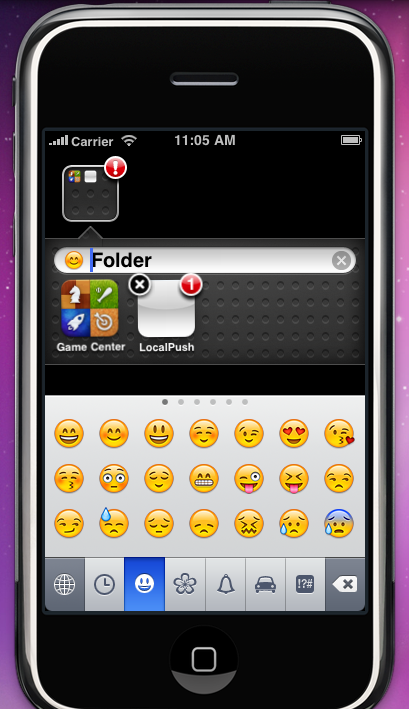
Enable Emoji Keyboard in iPhone Simulator OS 4.0 beta


iPhone Simulator can enable Emoji in the new iPhone SDK 4.0 beta (similar to previous releases) in here

/Users/yourusername/Library/Application\ Support/iPhone\ Simulator/4.0/Library/Preferences/com.apple.Preferences.plist


.
.
.

Saturday, April 10, 2010

Local Notification Sample Code (OS 4.0 only)

Start a new Window-based Application Project called LocalPush

Add an instance variable bgTask in LocalPushAppDelegate


@interface LocalPushAppDelegate : NSObject {
    UIWindow *window;
    UIBackgroundTaskIdentifier bgTask;
}


It will fire up a Local Notification to remind you one min before the event which is 2 minutes due from now

LocalPushAppDelegate.m Select all

//
// LocalPushAppDelegate.m
// LocalPush
//

@interface ToDoItem : NSObject {
NSInteger year;
NSInteger month;
NSInteger day;
NSInteger hour;
NSInteger minute;
NSInteger second;
NSString *eventName;
}

@property (nonatomic, readwrite) NSInteger year;
@property (nonatomic, readwrite) NSInteger month;
@property (nonatomic, readwrite) NSInteger day;
@property (nonatomic, readwrite) NSInteger hour;
@property (nonatomic, readwrite) NSInteger minute;
@property (nonatomic, readwrite) NSInteger second;
@property (nonatomic, copy) NSString *eventName;

@end

@implementation ToDoItem

@synthesize year, month, day, hour, minute, second, eventName;

@end

#import "LocalPushAppDelegate.h"

@implementation LocalPushAppDelegate

@synthesize window;

#define ToDoItemKey @"EVENTKEY1"
#define MessageTitleKey @"MSGKEY1"


- (BOOL)application:(UIApplication *)application didFinishLaunchingWithOptions:(NSDictionary *)launchOptions {
NSLog(@"application: didFinishLaunchingWithOptions:");
// Override point for customization after application launch

UILocalNotification *localNotif = [launchOptions
objectForKey:UIApplicationLaunchOptionsLocalNotificationKey];

if (localNotif) {
NSString *itemName = [localNotif.userInfo objectForKey:ToDoItemKey];
// [viewController displayItem:itemName]; // custom method
application.applicationIconBadgeNumber = localNotif.applicationIconBadgeNumber-1;
NSLog(@"has localNotif %@",itemName);
}
else {
[[UIApplication sharedApplication] cancelAllLocalNotifications];
NSDate *now = [NSDate date];
NSLog(@"now is %@",now);
NSDate *scheduled = [now dateByAddingTimeInterval:120] ; //get x minute after
NSCalendar *calendar = [NSCalendar currentCalendar];

unsigned int unitFlags = NSYearCalendarUnit|NSMonthCalendarUnit|NSDayCalendarUnit|NSHourCalendarUnit|NSMinuteCalendarUnit;
NSDateComponents *comp = [calendar components:unitFlags fromDate:scheduled];

NSLog(@"scheduled is %@",scheduled);

ToDoItem *todoitem = [[ToDoItem alloc] init];

todoitem.day = [comp day];
todoitem.month = [comp month];
todoitem.year = [comp year];
todoitem.hour = [comp hour];
todoitem.minute = [comp minute];
todoitem.eventName = @"Testing Event";

[self scheduleNotificationWithItem:todoitem interval:1];
NSLog(@"scheduleNotificationWithItem");
}
[window makeKeyAndVisible];
return YES;
}

- (void)application:(UIApplication *)application didReceiveLocalNotification:(UILocalNotification *)notif {
NSLog(@"application: didReceiveLocalNotification:");
NSString *itemName = [notif.userInfo objectForKey:ToDoItemKey];
NSString *messageTitle = [notif.userInfo objectForKey:MessageTitleKey];
// [viewController displayItem:itemName]; // custom method
[self _showAlert:itemName withTitle:messageTitle];
NSLog(@"Receive Local Notification while the app is still running...");
NSLog(@"current notification is %@",notif);
application.applicationIconBadgeNumber = notif.applicationIconBadgeNumber-1;

}

- (void) _showAlert:(NSString*)pushmessage withTitle:(NSString*)title
{

UIAlertView* alertView = [[UIAlertView alloc] initWithTitle:title message:pushmessage delegate:self cancelButtonTitle:@"OK" otherButtonTitles:nil];
[alertView show];
if (alertView) {
[alertView release];
}
}


- (void)scheduleNotificationWithItem:(ToDoItem *)item interval:(int)minutesBefore {
NSCalendar *calendar = [NSCalendar autoupdatingCurrentCalendar];
NSDateComponents *dateComps = [[NSDateComponents alloc] init];
[dateComps setDay:item.day];
[dateComps setMonth:item.month];
[dateComps setYear:item.year];
[dateComps setHour:item.hour];
[dateComps setMinute:item.minute];
NSDate *itemDate = [calendar dateFromComponents:dateComps];
[dateComps release];


UILocalNotification *localNotif = [[UILocalNotification alloc] init];
if (localNotif == nil)
return;
localNotif.fireDate = [itemDate dateByAddingTimeInterval:-(minutesBefore*60)];
NSLog(@"fireDate is %@",localNotif.fireDate);
localNotif.timeZone = [NSTimeZone defaultTimeZone];

localNotif.alertBody = [NSString stringWithFormat:NSLocalizedString(@"%@ in %i minutes.", nil),
item.eventName, minutesBefore];
localNotif.alertAction = NSLocalizedString(@"View Details", nil);

localNotif.soundName = UILocalNotificationDefaultSoundName;
localNotif.applicationIconBadgeNumber = 1;
// NSDictionary *infoDict = [NSDictionary dictionaryWithObject:item.eventName forKey:ToDoItemKey];
NSDictionary *infoDict = [NSDictionary dictionaryWithObjectsAndKeys:item.eventName,ToDoItemKey, @"Local Push received while running", MessageTitleKey, nil];
localNotif.userInfo = infoDict;

[[UIApplication sharedApplication] scheduleLocalNotification:localNotif];
NSLog(@"scheduledLocalNotifications are %@", [[UIApplication sharedApplication] scheduledLocalNotifications]);
[localNotif release];
}

- (NSString *) checkForIncomingChat {
return @"javacom";
};

- (void)applicationDidEnterBackground:(UIApplication *)application {
NSLog(@"Application entered background state.");
// UIBackgroundTaskIdentifier bgTask is instance variable
// UIInvalidBackgroundTask has been renamed to UIBackgroundTaskInvalid
NSAssert(self->bgTask == UIBackgroundTaskInvalid, nil);

bgTask = [application beginBackgroundTaskWithExpirationHandler: ^{
dispatch_async(dispatch_get_main_queue(), ^{
[application endBackgroundTask:self->bgTask];
self->bgTask = UIBackgroundTaskInvalid;
});
}];

dispatch_async(dispatch_get_main_queue(), ^{
while ([application backgroundTimeRemaining] > 1.0) {
NSString *friend = [self checkForIncomingChat];
if (friend) {
UILocalNotification *localNotif = [[UILocalNotification alloc] init];
if (localNotif) {
localNotif.alertBody = [NSString stringWithFormat:
NSLocalizedString(@"%@ has a message for you.", nil), friend];
localNotif.alertAction = NSLocalizedString(@"Read Msg", nil);
localNotif.soundName = @"alarmsound.caf";
localNotif.applicationIconBadgeNumber = 1;
NSDictionary *infoDict = [NSDictionary dictionaryWithObjectsAndKeys:@"Your Background Task works",ToDoItemKey, @"Message from javacom", MessageTitleKey, nil];
localNotif.userInfo = infoDict;
[application presentLocalNotificationNow:localNotif];
[localNotif release];
friend = nil;
break;
}
}
}
[application endBackgroundTask:self->bgTask];
self->bgTask = UIBackgroundTaskInvalid;
});
}


- (void)dealloc {
[window release];
[super dealloc];
}


@end


.
.
.

Tuesday, April 6, 2010

Old versions of iPhone SDK

You need Apple developer account to login
But Apple has disabled some of the links recently

iPhone SDK 2.2.1 Leopard (10.5.4)
http://developer.apple.com/iphone/download.action?path=/iphone/iphone_sdk_for_iphone_os_2.2.1__9m2621a__final/iphone_sdk_for_iphone_os_2.2.19m2621afinal.dmg
or here

iPhone SDK 3.0 (Xcode 3.1.3) Leopard (10.5.7)
http://developer.apple.com/iphone/download.action?path=/iphone/iphone_sdk_3.0__final/iphone_sdk_3.0__leopard__9m2736__final.dmg


iPhone SDK 3.0 (Xcode 3.2) Snow Leopard (10.6.0)
http://developer.apple.com/iphone/download.action?path=/iphone/iphone_sdk_3.0__final/iphone_sdk_3.0__snow_leopard__final.dmg

iPhone SDK 3.1 with Xcode 3.1.4 Leopard (10.5.7)
http://developer.apple.com/iphone/download.action?path=/iphone/iphone_sdk_3.1__final/iphone_sdk_3.1_with_xcode_3.1_final__leopard__9m2809.dmg
or here

iPhone SDK 3.1 with XCode 3.2.1 for Snow Leopard (10.6.0)
http://developer.apple.com/iphone/download.action?path=/iphone/iphone_sdk_3.1__final/iphone_sdk_3.1_with_xcode_3.2_final__snow_leopard__10a432.dmg

iPhone SDK 3.1.2 with XCode 3.1.4 for Leopard (10.5.7)
http://developer.apple.com/iphone/download.action?path=/iphone/iphone_sdk_3.1.2__final/iphone_sdk_3.1.2_with_xcode_3.1.4__leopard__9m2809.dmg

iPhone SDK 3.1.2 with XCode 3.2.1 for Snow Leopard (10.6.0)
http://developer.apple.com/iphone/download.action?path=/iphone/iphone_sdk_3.1.2__final/iphone_sdk_3.1.2_with_xcode_3.2.1__snow_leopard__10m2003.dmg


Update : You are too late, Apple has removed the links above.


iPhone SDK 3.1.3 with XCode 3.1.4 for Leopard (10.5.7)
http://developer.apple.com/ios/download.action?path=/iphone/iphone_sdk_3.1.3__final/iphone_sdk_3.1.3_with_xcode_3.1.4__leopard__9m2809a.dmg

iPhone SDK 3.1.3 with XCode 3.2.1 for Snow Leopard (10.6.0)
http://developer.apple.com/ios/download.action?path=/iphone/iphone_sdk_3.1.3__final/iphone_sdk_3.1.3_with_xcode_3.2.1__snow_leopard__10m2003a.dmg

iPhone SDK 3.2 Final with Xcode 3.2.2 for Snow Leopard (10.6.0)
http://developer.apple.com/ios/download.action?path=/iphone/iphone_sdk_3.2__final/xcode_3.2.2_and_iphone_sdk_3.2_final.dmg

Xcode 3.2.3 and iPhone SDK 4 GM seed for Snow Leopard (10.6.2)
http://developer.apple.com/ios/download.action?path=/iphone/iphone_sdk_4_gm_seed/xcode_3.2.3_and_iphone_sdk_4_gm_seed.dmg

Xcode 3.2.3 and iPhone SDK 4 Final for Snow Leopard (10.6.2)
http://developer.apple.com/ios/download.action?path=/iphone/iphone_sdk_4__final/xcode_3.2.3_and_iphone_sdk_4__final.dmg

Xcode 3.2.3 and iOS SDK 4.0.1 for Snow Leopard (10.6.4)
http://developer.apple.com/ios/download.action?path=/ios/ios_sdk_4.0.1__final/xcode_3.2.3_and_ios_sdk_4.0.1.dmg

Xcode 3.2.3 and iOS SDK 4.0.2 for Snow Leopard (10.6.4)
http://developer.apple.com/ios/download.action?path=/ios/ios_sdk_4.0.2__final/xcode_3.2.3_and_ios_sdk_4.0.2.dmg

Xcode 3.2.4 and iOS SDK 4.1 for Snow Leopard (10.6.4)
http://developer.apple.com/ios/download.action?path=/ios/ios_sdk_4.1__final/xcode_3.2.4_and_ios_sdk_4.1.dmg

Xcode 3.2.5 and iOS SDK 4.2 GM for Snow Leopard (10.6.4)
http://developer.apple.com/ios/download.action?path=/ios/ios_sdk_4.2_gm_seed/xcode_3.2.5_and_ios_sdk_4.2_gm_seed.dmg

Xcode 3.2.5 and iOS SDK 4.2 for Snow Leopard (10.6.4)
http://developer.apple.com/ios/download.action?path=/ios/ios_sdk_4.2__final/xcode_3.2.5_and_ios_sdk_4.2_final.dmg

Xcode 3.2.6 and iOS SDK 4.3 GM Seed for Snow Leopard (10.6.6)
http://developer.apple.com/devcenter/download.action?path=/ios/ios_sdk_4.3_gm_seed/xcode_3.2.6_and_ios_sdk_4.3_gm_seed.dmg

Xcode 3.2.6 and iOS SDK 4.3 for Snow Leopard (10.6.6)
http://adcdownload.apple.com/Developer_Tools/xcode_3.2.6_and_ios_sdk_4.3__final/xcode_3.2.6_and_ios_sdk_4.3__final.dmg

Xcode 3.2.6 and iOS SDK 4.3.1 for Snow Leopard (10.6.6)
http://adcdownload.apple.com/Developer_Tools/xcode_3.2.6_and_ios_sdk_4.3__final/xcode_3.2.6_and_ios_sdk_4.3.dmg

Xcode 4 and iOS SDK 4.3 for Snow Leopard (10.6.6)
http://developer.apple.com/devcenter/download.action?path=/Developer_Tools/xcode_4_and_ios_sdk_4.3__final/xcode_4_and_ios_sdk_4.3__final.dmg


Xcode 4.0.1 and iOS SDK 4.3.1 for Snow Leopard (10.6.6)
http://developer.apple.com/devcenter/download.action?path=/Developer_Tools/xcode_4.0.1_and_ios_sdk_4.3/xcode_4.0.1_and_ios_sdk_4.3.dmg


Xcode 4.0.2 and iOS SDK 4.3.2 for Snow Leopard (10.6.6)
http://developer.apple.com/devcenter/download.action?path=/Developer_Tools/xcode_4.0.2_and_ios_sdk_4.3/xcode_4.0.2_and_ios_sdk_4.3.dmg

Xcode 4.1 for Snow Leopard (10.6.6)
https://developer.apple.com/downloads/download.action?path=Developer_Tools/xcode_4.1_for_snow_leopard_21110/xcode_4.1_for_snow_leopard.dmg

Xcode 4.1 for Lion (10.7)
https://developer.apple.com/downloads/download.action?path=Developer_Tools/xcode_4.1_for_lion/xcode_4.1_for_lion.dmg

Xcode 4.2 and iOS SDK 5.0 for Snow Leopard (10.6.6)
https://developer.apple.com/downloads/download.action?path=Developer_Tools/xcode_4.2_for_snow_leopard/xcode_4.2_for_snow_leopard.dmg

https://developer.apple.com/devcenter/download.action?path=/Developer_Tools/xcode_4.2_with_ios_5_sdk/xcode_4.2_and_ios_5_sdk_for_snow_leopard.dmg

Xcode 4.2 and iOS SDK 5.0 for Lion (10.7)
https://developer.apple.com/downloads/download.action?path=Developer_Tools/xcode_4.2_for_lion_21179/xcode_4.2_for_lion.dmg

http://developer.apple.com/devcenter/download.action?path=/Developer_Tools/xcode_4.2_with_ios_5_sdk/xcode_4.2_and_ios_5_sdk_for_lion.dmg

Xcode 4.2.1 and iOS SDK 5.0 for Lion (10.7)
http://developer.apple.com/downloads/download.action?path=Developer_Tools/xcode_4.2.1_for_lion/xcode_4.2.1_for_lion.dmg

Xcode 4.3 and iOS SDK 5.0 for Lion (10.7.2)
Note: For Xcode 4.3, you need also to install the optional components such as command line tools, and previous iOS Simulators from Xcode’s Download’s preferences
http://adcdownload.apple.com/Developer_Tools/xcode_4.3_for_lion_21266/xcode_43_lion.dmg

Xcode 4.3.1 and iOS SDK 5.1 for Lion (10.7.3)
http://adcdownload.apple.com/Developer_Tools/xcode_4.3.1_for_lion_21267/xcode_431_lion.dmg

Xcode 4.3.2 and iOS SDK 5.1 for Lion (10.7.3)
http://adcdownload.apple.com/Developer_Tools/xcode_4.3.2/xcode_432_lion.dmg

Xcode 4.3.3 and iOS SDK 5.1 for Lion (10.7.3)
http://adcdownload.apple.com/Developer_Tools/xcode_4.3.3_for_lion/xcode_4.3.3_for_lion.dmg

Xcode 4.4 and iOS SDK 5.1 for Lion (10.7.3) or Mountain Lion (10.8)
http://adcdownload.apple.com/Developer_Tools/xcode_4.4_21362/xcode446938108a.dmg

Xcode 4.4.1 and iOS SDK 5.1 for Lion (10.7.3) or Mountain Lion (10.8)
http://adcdownload.apple.com/Developer_Tools/xcode_4.4.1/xcode_4.4.1_6938145.dmg
http://adcdownload.apple.com/Developer_Tools/xcode_4.4.1/command_line_tools_for_xcode_os_x_mountain_lion_aug_2012.dmg

Xcode 4.5 and iOS SDK 6 GM Seed for Lion (10.7.4) and Mountain Lion (10.8)
http://adcdownload.apple.com//Developer_Tools/xcode_4.5_gm_seed/xcode_4.5_gm_seed.dmg

Xcode 4.5 and iOS SDK 6 for Lion (10.7.4) and Mountain Lion (10.8)
http://adcdownload.apple.com/Developer_Tools/xcode_4.5/xcode_4.5.dmg

Command Line Tool for Xcode 4.5 for Mountain Lion (10.8)
http://adcdownload.apple.com/Developer_Tools/command_line_tools_for_xcode_4.5_os_x_mountain_lion__september_2012/command_line_tools_for_xcode_4.5_os_x_mountain_lion.dmg

Command Line Tool for Xcode 4.5 for Lion (10.7.4)
http://adcdownload.apple.com/Developer_Tools/command_line_tools_for_xcode_4.5_os_x_lion__september_2012/command_line_tools_for_xcode_4.5_os_x_lion.dmg


.
.
.

Saturday, December 26, 2009

iPhone SDK 3.0 API Explorer

The previous version is for OS 2.2 and is here
http://iphonesdkdev.blogspot.com/2008/12/iphone-sdk-api-explorer.html

It is now updated to support OS 3.0 and with on-line reference to Erica Sadun 3.1.2 class documentation

Installation Instructions:

Cydia Source : http://cydia.iphone.org.hk/apt/
Section: Utilities
Name: API Explorer 3.0

Updated source code for version 3.0 is here
svn checkout http://apiexplorer.googlecode.com/svn/trunk/apiexplorer3

or download it (revision 25) here
http://apiexplorer.googlecode.com/files/apiexplorer3.zip

The project can be built using Xcode or iphone gcc. The Makefile has been updated, so that it can be compiled under iphone gcc for 3.0 framework. Refer here for the 3.0 headers for iphone gcc.

The Cydia version did not have all the frameworks (e.g. GameKit and others). To explore more frameworks, you need to download the source code and build your own version.

For Xcode, just add the required frameworks before build. For iphone gcc, just add LDFLAGS (like the one below) in the Makefile and then make install.

LDFLAGS += -framework GameKit

If you want to have on-line reference to 3.0.0 framework instead of 3.1.2 from Erica's website, you should build your code.plist. Here is the script to dump the dictionary key-string pairs for 3.0.0

#!/bin/sh
curl -s -L http://ericasadun.com/iPhoneDocs300/annotated.html | grep "tr..td" | sed -e "s/^.*href=\"\(.*html\)\".\(.*\)\/a.*$/\<key\>\2\/key\>\<string\>\1\<\/string\>/g;"


This is how to dump the method name to class key-string values
method2class.plist Select all

#!/bin/sh
for page in "" _0x61 _0x62 _0x63 _0x64 _0x65 _0x66 _0x67 _0x68 _0x69 _0x6a _0x6b _0x6c _0x6d _0x6e _0x6f _0x70 _0x71 _0x72 _0x73 _0x74 _0x75 _0x76 _0x77 _0x78 _0x79 _0x7a ; do
curl -s -L http://ericasadun.com/iPhoneDocs312/functions_func${page}.html | awk '/^.li./{s=$0;next}{print s " "$0}' | sed -e "s/^.li.\(.*\)\s[:,].*a\sclass..el..href..*html.*\">\(.*\)<\/a>$/\<key\>\1\<\/key\>\<array\>\<string\>\2\<\/string\>\<\/array\>/g;" | grep "<key>" | sed -e "s/(.*)//g" | awk -F "</key>" '!arr[$1] {arr[$1] = $0; next} {arr[$1] = arr[$1] " " $2} END {for(i in arr) {print arr[i]}}' | sed -e "s/<\/array> <array>//g"
done


Latest screen dump for version 3.1 (not yet released)


Wednesday, December 9, 2009

[How-to] compile SmartScreen widget in iphone gcc

Here is a sample clock widget source from SmartScreen sdk http://media-phone.ch/en/software/smartscreen/sdk/ , I added a Makefile so that it can be compiled under iphone gcc

http://apiexplorer.googlecode.com/files/ClockWidget.zip

Make sure you have installed iphone gcc and 3.0 headers (refer here for the 3.0 headers) and also SmartScreen (Lite or full version) before your testing.

If you have installed toolchain and 3.0 headers under cygwin or linux, just modify the sdk location in the Makefile and it should compile as well.

SmartScreen widget will be installed under the folder /var/mobile/Library/SmartScreen

To compile and install this sample clock widget under iphone gcc

make
make install


To uninstall the clock widget

make uninstall


This is the updated Makefile for SmartScreen ClockWidget
Makefile Select all

# Makefile for gcc compiler for iPhone (SmartScreen Widget)

PROJECTNAME:=Clock
PRINCIPALCLASS:=$(PROJECTNAME)Widget
WIDGETFOLDER:=$(PROJECTNAME).wdgt
INSTALLFOLDER:=/var/mobile/Library/SmartScreen
MINIMUMVERSION:=3.0

CC:=arm-apple-darwin9-gcc
CPP:=arm-apple-darwin9-g++
LD:=$(CC)
SDK:=/var/toolchain/sys30

LDFLAGS = -arch arm -lobjc
LDFLAGS += -framework CoreFoundation
LDFLAGS += -framework Foundation
LDFLAGS += -framework UIKit
LDFLAGS += -framework CoreGraphics
//LDFLAGS += -framework AddressBook
//LDFLAGS += -framework AddressBookUI
//LDFLAGS += -framework AudioToolbox
//LDFLAGS += -framework AudioUnit
//LDFLAGS += -framework AVFoundation
//LDFLAGS += -framework CoreSurface
//LDFLAGS += -framework CoreAudio
//LDFLAGS += -framework CoreData
//LDFLAGS += -framework CFNetwork
//LDFLAGS += -framework GraphicsServices
//LDFLAGS += -framework OpenAL
//LDFLAGS += -framework OpenGLES
//LDFLAGS += -framework MediaPlayer
//LDFLAGS += -framework QuartzCore
//LDFLAGS += -framework Security
//LDFLAGS += -framework SystemConfiguration
//LDFLAGS += -framework WebCore
//LDFLAGS += -framework WebKit
//LDFLAGS += -framework SpringBoardUI
//LDFLAGS += -framework TelephonyUI
//LDFLAGS += -framework JavaScriptCore
//LDFLAGS += -framework PhotoLibrary
LDFLAGS += -L"$(SDK)/usr/lib"
LDFLAGS += -F"$(SDK)/System/Library/Frameworks"
LDFLAGS += -F"$(SDK)/System/Library/PrivateFrameworks"
LDFLAGS += -bind_at_load
LDFLAGS += -multiply_defined suppress
LDFLAGS += -march=armv6
LDFLAGS += -mcpu=arm1176jzf-s
LDFLAGS += -mmacosx-version-min=10.5
LDFLAGS += -dynamiclib

CFLAGS += -I"$(SDK)/usr/include"
CFLAGS += -DDEBUG -std=gnu99 -O0
CFLAGS += -Diphoneos_version_min=$(MINIMUMVERSION)
CFLAGS += -Wno-attributes -Wno-trigraphs -Wreturn-type -Wunused-variable

BUILDDIR=./build/$(MINIMUMVERSION)
SRCDIR=./
RESDIR=./Resources
OBJS+=$(patsubst %.m,%.o,$(wildcard $(SRCDIR)/*.m))
OBJS+=$(patsubst %.c,%.o,$(wildcard $(SRCDIR)/*.c))
OBJS+=$(patsubst %.mm,%.o,$(wildcard $(SRCDIR)/*.mm))
OBJS+=$(patsubst %.cpp,%.o,$(wildcard $(SRCDIR)/*.cpp))
OBJS+=$(patsubst %.m,%.o,$(wildcard ./*.m))
PCH=$(wildcard *.pch)
RESOURCES=$(wildcard $(RESDIR)/*)

CFLAGS += $(addprefix -I,$(SRCDIR))

CPPFLAGS=$CFLAGS

all: $(PROJECTNAME)

$(PROJECTNAME): $(OBJS) Makefile
    $(LD) $(LDFLAGS) $(filter %.o,$^) -o $@

%.o: %.m %.h $(PCH) $(filter-out $(patsubst %.o,%.h,$(OBJS)), $(wildcard $(SRCDIR)/*.h))
    $(CC) --include $(PCH) -c $(CFLAGS) $< -o $@

%.o: %.c %.h $(PCH)
    $(CC) --include $(PCH) -c $(CFLAGS) $< -o $@

%.o: %.mm %.h $(PCH) $(filter-out $(patsubst %.o,%.h,$(OBJS)), $(wildcard $(SRCDIR)/*.h))
    $(CPP) --include $(PCH) -c $(CPPFLAGS) $< -o $@

%.o: %.cpp %.h $(PCH)
    $(CPP) --include $(PCH) -c $(CPPFLAGS) $< -o $@

dist: $(PROJECTNAME) Info.plist Makefile $(RESOURCES)
    @rm -rf $(BUILDDIR)
    @mkdir -p $(BUILDDIR)/$(WIDGETFOLDER)
ifneq ($(RESOURCES),)
    @-cp -r $(RESOURCES) $(BUILDDIR)/$(WIDGETFOLDER)
    @-$(foreach DIR, .svn .DS_Store .git* , find $(BUILDDIR)/$(APPFOLDER) -name '$(DIR)' -prune -exec rm -rfv {} \;;)
endif
    @cp Info.plist $(BUILDDIR)/$(WIDGETFOLDER)/Info.plist
    @./plutil -key CFBundleExecutable -value $(PROJECTNAME) $(BUILDDIR)/$(WIDGETFOLDER)/Info.plist
    @./plutil -key CFBundleName -value $(PROJECTNAME) $(BUILDDIR)/$(WIDGETFOLDER)/Info.plist
    @./plutil -key NSPrincipalClass -value $(PRINCIPALCLASS) $(BUILDDIR)/$(WIDGETFOLDER)/Info.plist
    ldid -S $(PROJECTNAME)
    @mv $(PROJECTNAME) $(BUILDDIR)/$(WIDGETFOLDER)

install: dist
    @rm -fr $(INSTALLFOLDER)/$(WIDGETFOLDER)
    cp -r $(BUILDDIR)/$(WIDGETFOLDER) $(INSTALLFOLDER)/
    @chown -R mobile:mobile $(INSTALLFOLDER)/$(WIDGETFOLDER)
    @echo "Widget $(WIDGETFOLDER) installed, please respring device"
    @./respring

uninstall:
    @rm -fr $(INSTALLFOLDER)/$(WIDGETFOLDER)
    @./respring
    @echo "Widget $(WIDGETFOLDER) uninstalled, please respring device"

install_respring:
    cp ./respring /usr/bin/respring

distclean:
    @rm -rf $(BUILDDIR)

clean:
    @rm -f $(OBJS)
    @rm -rf $(BUILDDIR)
    @rm -f $(PROJECTNAME)

.PHONY: all dist install uninstall install_respring distclean clean