Showing posts with label SDK. Show all posts

Monday, December 30, 2013

How to install thoes under Xcode 5 (iOS 7)

(1) Installation (note : you have to install Command Line Tools (Mountain Lion/Mavericks) for Xcode 5)
install_theos.sh    Select all
# clone theos.git cd ~ git clone https://github.com/rpetrich/theos.git theos-rpetrich # clone iphoneheaders.git cd ~/theos-rpetrich/; ./git-submodule-recur.sh init; git submodule update --recursive # get dpkg-deb for Mac OS X curl -OL http://test.saurik.com/francis/dpkg-deb-fat chmod a+x dpkg-deb-fat sudo mkdir -p /usr/local/bin sudo mv dpkg-deb-fat /usr/local/bin/dpkg-deb # get ldid for Mac OS X cd ~/theos-rpetrich/bin curl -OL http://joedj.net/ldid chmod a+x ldid # get libsubstrate.dylib (multiple archs and supports arm64) cd ~/theos-rpetrich/lib curl -OL http://cdn.hbang.ws/dl/libsubstrate_arm64.dylib mv libsubstrate_arm64.dylib libsubstrate.dylib


Download Xcode_4.4.1 and Xcode_4.6.2 from https://developer.apple.com/downloads/index.action and drag them to /Applications folder Rename them as /Applications/Xcode_4.4.1.app and /Applications/Xcode_4.6.2.app Download the latest Xcode 5 and install it

(2) get ilogit for test build
mkdir -p ~/Projects
cd ~/Projects
curl -OL https://dl.dropboxusercontent.com/u/15373/Other/iPhone/ilogit-tweak-ios7-example.tar
tar -xf ilogit-tweak-ios7-example.tar

#make symlink
cd ilogit
ln -s ~/theos-rpetrich theos


(3) Modify Makefile, change to

Makefile    Select all
TARGET := iphone:clang THEOS_PLATFORM_SDK_ROOT_armv6 = /Applications/Xcode_4.4.1.app/Contents/Developer THEOS_PLATFORM_SDK_ROOT_armv7 = /Applications/Xcode_4.6.2.app/Contents/Developer THEOS_PLATFORM_SDK_ROOT_arm64 = /Applications/Xcode.app/Contents/Developer SDKVERSION_armv6 = 5.1 SDKVERSION_armv7 = 6.1 SDKVERSION_arm64 = 7.0 TARGET_IPHONEOS_DEPLOYMENT_VERSION_armv6 = 5.1 TARGET_IPHONEOS_DEPLOYMENT_VERSION_armv7 = 6.1 TARGET_IPHONEOS_DEPLOYMENT_VERSION_arm64 = 7.0 IPHONE_ARCHS = armv6 armv7 arm64 TWEAK_NAME = iLogIt iLogIt_FILES = Tweak.xm iLogIt_LIBRARIES = substrate include theos/makefiles/common.mk include $(THEOS_MAKE_PATH)/tweak.mk


(4) Make package

make package


Please refer to this for the updated iOS7 tweaks http://iphonedevwiki.net/index.php/Updating_extensions_for_iOS_7

.
.
.

Sunday, June 24, 2012

How to install thoes under Xcode 4.5 (iOS 6)

(1) Installation (note : you have to install Command Line Tools (Mountain Lion) for Xcode 4.5)
if you don't have Command Line Tools use
/Applications/Xcode.app/Contents/Developer/usr/bin/git
install_theos.sh    Select all
# clone theos.git cd ~ git clone git://github.com/DHowett/theos.git # clone iphoneheaders.git cd ~/theos/ mv include include.bak git clone git://github.com/rpetrich/iphoneheaders.git include for FILE in include.bak/*.h; do mv $FILE include/; done rmdir include.bak/ # get IOSurfaceAPI.h cd ~/theos/include/IOSurface/ curl -O -k https://raw.github.com/javacom/toolchain4/master/Projects/IOSurfaceAPI.h # clone theos-nic-templates.git cd ~/theos/templates/ git clone git://github.com/orikad/theos-nic-templates.git # get dpkg-deb for Mac OS X cd ~/theos curl -OL http://test.saurik.com/francis/dpkg-deb-fat chmod a+x dpkg-deb-fat sudo mkdir -p /usr/local/bin sudo mv dpkg-deb-fat /usr/local/bin/dpkg-deb # get ldid for Mac OS X cd ~/theos/bin curl -OL http://dl.dropbox.com/u/3157793/ldid chmod a+x ldid # get libsubstrate.dylib substrate.h cd ~/theos curl -OL http://apt.saurik.com/debs/mobilesubstrate_0.9.4001_iphoneos-arm.deb dpkg-deb -x mobilesubstrate_0.9.4001_iphoneos-arm.deb mobilesubstrate cp mobilesubstrate/Library/Frameworks/CydiaSubstrate.framework/CydiaSubstrate ~/theos/lib/libsubstrate.dylib cp mobilesubstrate/Library/Frameworks/CydiaSubstrate.framework/Headers/CydiaSubstrate.h include/substrate.h


Download and untar iPhoneOS5.1.sdk.tgz to Xcode
cd /Applications/Xcode.app/Contents/Developer/Platforms/iPhoneOS.platform/Developer/SDKs/
tar xzvf ~/Downloads/iPhoneOS5.1.sdk.tgz


(2) get preferenceloader.git for test build
mkdir -p ~/Projects
cd ~/Projects/
git clone git://github.com/DHowett/preferenceloader.git
cd ~/Projects/preferenceloader/


(3) Modify Makefile, change from

include framework/makefiles/common.mk

to

#export TARGET=iphone:latest:2.0
export ARCHS=armv7
include $(THEOS)/makefiles/common.mk
#include framework/makefiles/common.mk


(4) Test build preferenceloader
cd ~/Projects/preferenceloader/
export THEOS=~/theos
make
make package


(5.1) Clone IconRenamer Project
#get CaptainHook headers
cd ~/theos/include/
rm -fr CaptainHook
git clone git://github.com/rpetrich/CaptainHook.git
#get and build IconRenamer
cd ~/Projects
git clone git://github.com/rpetrich/IconRenamer.git
cd ~/Projects/IconRenamer
rmdir framework; ln -sf ~/theos framework

(5.2) Modify Makefile to

export TARGET=iphone:5.1
TWEAK_NAME = IconRenamer
IconRenamer_OBJC_FILES = IconRenamer.m
IconRenamer_FRAMEWORKS = Foundation UIKit

ADDITIONAL_CFLAGS = -std=c99

include $(THEOS)/makefiles/common.mk
include $(THEOS)/makefiles/tweak.mk

(5.3) Build IconRenamer

export THEOS=~/theos
cd ~/Projects/IconRenamer
make
make package


(6) Test build UICatalog
cd ~/Projects
svn co http://apiexplorer.googlecode.com/svn/trunk/UICatalog UICatalog
cd ~/Projects/UICatalog
sed '/^SYSROOT/d' Makefile.theos > Makefile
export THEOS=~/theos
make
make ipa


Please refer to this for the updated iOS7 tweaks http://iphonedevwiki.net/index.php/Updating_extensions_for_iOS_7 .
.
.

Saturday, October 18, 2008

[How-To] Install llvm-gcc for iPhone SDK 2.0 in Linux

The building of iPhone gcc in Linux is described in
http://www.saurik.com/id/4

But this guide involved a lot of downloading and patching, so I put all the downloading in one zipped tar file. All you have to do is download it and run the build script in your Linux

I used the Asus eeepc Linux as an example, but others Linux variant / cygwin should be very similar.

Asus eeepc comes with xandros Debian Linux but does not have development tools. This part(A) shows you how to setup the development tools first. Other Linux variant does have development tools and you might want to skip this part and continue on Part B

(A) Install the development tools in eeepc

(1) Launch Terminal (Ctrl-Alt-T) in eeepc

(2) edit the file/etc/apt/sources.list
sudo vi /etc/apt/sources.list

and add this line to the end of the file "sources.list"
deb http://http.us.debian.org/debian/ stable main

(3) Run these commands in Terminal to install building tools

sudo apt-get update
sudo apt-get upgrade
sudo apt-get install build-essential bison flex


(B) Download the file to your Linux
UpgradeToolChain2.tgz

The package is very large (about 200M)
You should first goto this websever
http://www.iphonefix.de/

and click the DOWNLOADS menu
and username password is generated for every visitor on the fly when you click on the ftp sever link

Inside the ftp server goto the folder
iPhoneToolchain VMWare Image / V3
and download the file UpgradeToolChain2.tgz

MD5 (UpgradeToolChain2.tgz) = b373c0e600d45b1019e2894614b5979b
Size (UpgradeToolChain2.tgz) = 202278454



and extract to /usr

cd /usr
sudo tar -xzvf ~/UpgradeToolChain2.tgz


(C) login in as superuser and build the Darwin CC tools and llvm-gcc in Linux

su
cd /usr/toolchain2
./build_20.sh

wait for 10+ minutes to complete the building of tools and gcc

If you extract the tgz to different folder and want to build it in some other folder, please modify the environment variable toolchain in build_20.sh

(D) Test build your project in Linux
The include files have the iPhone SDK headers so you can test it using some available open source project (without Interface Builder) that using SDK 2.0 headers

If you want ti upgrade to SDK 2.1/2.2 headers just copy and replace the 2.0 headers.

For example, download this WinterBoard App Source code from the developer and compile it in Linux

wget http://svn.saurik.com/repos/menes/trunk/winterboard/Application.mm

/usr/toolchain2/pre/bin/arm-apple-darwin9-g++ -g0 -O2 -Wall -Werror -o WinterBoard Application.mm \
-framework UIKit -framework Foundation -framework CoreFoundation -lobjc -framework CoreGraphics


If you want to deploy the app to iPhone, you have to codesign it (using ldid in iPhone) and provide the additional required project file in the .app folder e.g. (Info.plist, Icon.png etc)

Enjoy compiling and building iPhone App

Moreover, I have modified a previous VMWare image based on Debian Linux and build the llvm-gcc for iPhone and the toolchain and SDK20 headers there. If you have VMWare workstation or player / VMWare Fusion (Mac OS X), you can use it to build 2.0 iPhone app using ssh or samba mount access. The VMWare image is very large (about 1.2G compressed).

You should first goto this websever
http://www.iphonefix.de/

and click the download menu
and username password is generated for every visitor on the fly when you click on the ftp sever link

Inside the ftp server goto the folder
iPhoneToolchain VMWare Image / V3


and download the file
iPhoneToolchian_SDK20.rar

MD5 (iPhoneToolchain_SDK20.rar) = 29888ad8a73cf0a9674152c64961c02a
Size (iPhoneToolchain_SDK20.rar) = 1304054096

unrar the file and then use VMWare workstation or VMWare Fusion to open it

login: root
password: toolchain

The instructions are in the README.txt There are 3 sample projects inside the VMWare image

new!!
Install ldid in Linux, so that you can fake codesign it

cd ~/Projects
wget http://svn.telesphoreo.org/trunk/data/ldid/ldid-1.0.476.tgz
tar -zxf ldid-1.0.476.tgz
cd ldid-1.0.476
g++ -I . -o util/ldid{,.cpp} -x c util/{lookup2,sha1}.c
sudo cp -a util/ldid /usr/bin


Updates : The source of of ldid is moved to here
wget http://www.telesphoreo.org/export/477/trunk/data/ldid/ldid-1.0.476.tgz
or updated one here
wget http://svn.telesphoreo.org/trunk/data/ldid/ldid-1.0.610.tgz

Updates : If you compiled it in cgywin, you need to add (uint32_t) in the source code ldid.cpp that has ambiguous overload call error message like this

error: call of overloaded 'Swap(int)' is ambiguous


If you need to codesign the iPhone binary in Linux add this (as one line) to your build script

export CODESIGN_ALLOCATE=/usr/toolchain2/pre/bin/arm-apple-darwin9-codesign_allocate; ldid -S $(PROJECTNAME)

A sample Makefile for Linux toolchain

Makefile: Select all

# Makefile for gcc compiler for Linux iPhone toolchain (SDK Headers)

PROJECTNAME=HelloWorld
APPFOLDER=$(PROJECTNAME).app
INSTALLFOLDER=$(PROJECTNAME).app

IPHONE_IP=10.0.2.2

SDK=/usr/toolchain2/sys
CC=/usr/toolchain2/pre/bin/arm-apple-darwin9-gcc
LD=$(CC)
LDFLAGS += -arch arm -lobjc
LDFLAGS += -framework CoreFoundation
LDFLAGS += -framework Foundation
LDFLAGS += -framework UIKit
LDFLAGS += -framework CoreGraphics
//LDFLAGS += -framework QuartzCore
//LDFLAGS += -framework GraphicsServices
//LDFLAGS += -framework CoreSurface
//LDFLAGS += -framework CoreAudio
//LDFLAGS += -framework Celestial
//LDFLAGS += -framework AudioToolbox
//LDFLAGS += -framework WebCore
//LDFLAGS += -framework WebKit
//LDFLAGS += -framework SystemConfiguration
LDFLAGS += -isysroot $(SDK)
LDFLAGS += -F"$(SDK)/System/Library/Frameworks"
LDFLAGS += -F"$(SDK)/System/Library/PrivateFrameworks"
LDFLAGS += -bind_at_load
LDFLAGS += -multiply_defined suppress
LDFLAGS += -march=armv6
LDFLAGS += -mcpu=arm1176jzf-s

CFLAGS += -isysroot $(SDK)
CFLAGS += -DDEBUG -Wall -std=c99
CFLAGS += -Diphoneos_version_min=2.0

BUILDDIR=./build/2.0
SRCDIR=./Classes
RESDIR=./Resources
OBJS+=$(patsubst %.m,%.o,$(wildcard $(SRCDIR)/*.m))
OBJS+=$(patsubst %.c,%.o,$(wildcard $(SRCDIR)/*.c))
OBJS+=$(patsubst %.m,%.o,$(wildcard ./*.m))
RESOURCES=$(wildcard $(RESDIR)/*)
RESOURCES+=$(wildcard ./*.png)

all: $(PROJECTNAME)

$(PROJECTNAME): $(OBJS)
$(LD) $(LDFLAGS) -o $@ $^

%.o: %.m
$(CC) -c $(CFLAGS) $< -o $@

%.o: %.c
$(CC) -c $(CFLAGS) $< -o $@

dist: $(PROJECTNAME)
rm -rf $(BUILDDIR)
mkdir -p $(BUILDDIR)/$(APPFOLDER)
cp -r $(RESOURCES) $(BUILDDIR)/$(APPFOLDER)
cp Info.plist $(BUILDDIR)/$(APPFOLDER)/Info.plist
@echo "APPL????" > $(BUILDDIR)/$(APPFOLDER)/PkgInfo
export CODESIGN_ALLOCATE=/usr/toolchain2/pre/bin/arm-apple-darwin9-codesign_allocate; ldid -S $(PROJECTNAME)
cp $(PROJECTNAME) $(BUILDDIR)/$(APPFOLDER)

install: dist
ping -t 3 -c 1 $(IPHONE_IP)
ssh root@$(IPHONE_IP) 'rm -fr /Applications/$(INSTALLFOLDER)'
scp -r $(BUILDDIR)/$(APPFOLDER) root@$(IPHONE_IP):/Applications/$(INSTALLFOLDER)
ssh root@$(IPHONE_IP) 'respring'
@echo "Application $(INSTALLFOLDER) installed"

uninstall:
ping -t 3 -c 1 $(IPHONE_IP)
ssh root@$(IPHONE_IP) 'rm -fr /Applications/$(INSTALLFOLDER); respring'
@echo "Application $(INSTALLFOLDER) uninstalled"

clean:
@rm -f $(SRCDIR)/*.o
@rm -rf $(BUILDDIR)
@rm -f $(PROJECTNAME)




Friday, September 19, 2008

Xcode Template for pwned iPhone device updated to version 3.5.2

This Xcode Template is now updated to version 3.5.2

To install, run these in Mac Terminal (assume you have installed the Xcode in /Developer folder)


curl -O http://apiexplorer.googlecode.com/files/ToolChainTemplate_v352.zip
unzip -o ToolChainTemplate_v352.zip -d "/Developer/Platforms/iPhoneOS.platform/Developer/Library/Xcode/Project Templates"

MD5 (ToolChainTemplate_v352.zip) = 5de15c4cc9f7bab7feeafff5f121da36


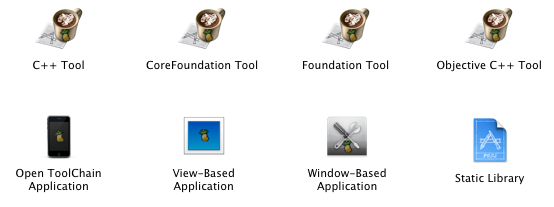
There are 4 new project templates to build the command line utility for iPhone
C++ Tool (.cpp)
CoreFoundation Tool (.c)
Foundation Tool (.m)
Objective C++ Tool (.mm)


These 4 command line utility templates used wifi connection to install compiled binary in your iPhone, so you need not connect your iPhone via usb port and MobileInstallation patch is not needed.

Requirements & Info:
(1) Default use Open toolchain headers
(2) iPhone and Mac connected to wifi (you should change the IPHONE_IP in Project Settings)
(3) Open SSH and Link Indenty Editor installed in iPhone
(4) Mac's ssh key installed in iPhone
(5) Debug / Release build to iPhone folder /private/var/root (no Build & Go) and you should change IPHONE_INSTALL_DIR in the Project Settings
(6) Cannot build to Simulator

Xcode Template Version 3.5.2 adds a Static Library Template for iPhone
To build the Universary Library for i386 and arm
First build it on "Device" "Release"
Second build it on "Simulator" "Release"
Then the Universary Library binary will be in the project directory
To examine the content of the Universary Library binary, run ./otoolprint.sh in the project folder


Open Tool Chain Application
This template uses open toolchain headers provides a starting point for any application without Interface Builder.

Requirements and Info:
(1) No Interface Builder
(2) Default use open toolchain headers
(3) For pwned iPhone / iPod Touch with patched MobileInstallation
(4) codesign certificate "iPhone Pwned Developer" installed in Mac
(5) XCode SDK Info.plist Setting has removed Provisioning Profile requirement
(6) Cannot build to Simulator


View-Based Application
This template provides a starting point for an application that uses a single view. It provides a view controller to manage the view, and a nib file that contains the view.

Requirements and Info:
(1) Default use official iPhone SDK headers
(2) For pwned iPhone / iPod Touch with patched MobileInstallation
(3) codesign certificate "iPhone Pwned Developer" installed in Mac
(4) XCode SDK Info.plist Setting has removed Provisioning Profile requirement

Window-Based Application
This template provides a starting point for any application without Interface Builder and provides a minimal iPhone application with a single view, ready for customizing.
This is a good starting point for your first application. In the UIView subclass, you can implement methods to draw content on the screen and to respond to touches. In a more full-featured application, you typically add a view controller to handle data and to manage rotation.

Requirements and Info:
(1) No Interface Builder
(2) Default use official iPhone SDK headers
(3) For pwned iPhone / iPod Touch with patched MobileInstallation
(4) codesign certificate "iPhone Pwned Developer" installed in Mac
(5) XCode SDK Info.plist Setting has removed Provisioning Profile requirement

Updated Notes
If you have "security policy error" after Build & Go. Do these steps

(1) Install a new free app from App Store in iPhone (not sync from iTunes)
(2) Launch that newly purchased free app and then close it.
(3) Reboot your iPhone (that is power off and on again)
(4) Launch the app again that you have Build & Go in Xcode to iPhone.

Thursday, September 18, 2008

[Firmware 2.1] How to skip provisioning profile for iPhone SDK

How to skip provisioning profile for iPhone SDK (build 9M2517) for firmware 2.1

First close your Xcode and backup the iPhoneOS.platform Info.plist by running this in Mac Terminal


sudo cp -p /Developer/Platforms/iPhoneOS.platform/Info.plist /Developer/Platforms/iPhoneOS.platform/Info.plist.bak


Then edit the iPhoneOS.platform Info.plist file

sudo vi /Developer/Platforms/iPhoneOS.platform/Info.plist


and change

<key>PROVISIONING_PROFILE_ALLOWED</key>
<string>YES</string>
<key>PROVISIONING_PROFILE_REQUIRED</key>
<string>YES</string>


to this


<key>PROVISIONING_PROFILE_ALLOWED</key>
<string>NO</string>
<key>PROVISIONING_PROFILE_REQUIRED</key>
<string>NO</string>


Launch Xcode and then create new project using my Xcode Template for pwned device "View-Based Application" to build and go to either Project Settings 2.0 or Project Settings 2.1 or iPhone Simulator and you don't need the trick to reset it anymore.

Remember, you still need a fake codesign identity and patched MobileInstallation binary in your iPhone.

If you are registered iPhone Developer with provisioning profile and codesign cert from Apple, please remember to revert the PhoneOS.platform Info.plist back to the original one before building your project to App Store.

Updated Notes
If you have "security policy error" after Build & Go. Do these steps

(1) Install a new free app from App Store in iPhone (not sync from iTunes)
(2) Launch that newly purchased free app and then close it.
(3) Reboot your iPhone (that is power off and on again)
(4) Launch the app again that you have Build & Go in Xcode to iPhone.

Please also refer to the latest article for SDK2.2.1
http://iphonesdkdev.blogspot.com/2009/01/how-to-skip-provisioning-profile-for.html


Sunday, September 14, 2008

Copy iPhone SDK headers from Mac to iPhone

Use this shell script in Mac Terminal to copy the installed SDK header files (firmware 2.1) to iPhone , if you have installed the iPhone SDK (build 9M2517) for (2.0 & 2.1 development)
directly and you have to change IPHONEIP for your actual iPhone IP address

copySDKHeaders2.sh : Select all

#!/bin/sh
IPHONEIP=10.0.2.2
#SDKVER=2.0
#SDKVER=2.1
SDKVER=2.2
sdkroot=/Developer/Platforms/iPhoneOS.platform/Developer/SDKs/iPhoneOS${SDKVER}.sdk/System/Library/Frameworks
sdkframeworks[1]=$sdkroot/AddressBook.framework/Headers/*
sdkframeworks[2]=$sdkroot/AddressBookUI.framework/Headers/*
sdkframeworks[3]=$sdkroot/AudioToolbox.framework/Headers/*
sdkframeworks[4]=$sdkroot/AudioUnit.framework/Headers/*
sdkframeworks[5]=$sdkroot/CFNetwork.framework/Headers/*
sdkframeworks[6]=$sdkroot/CoreAudio.framework/Headers/*
sdkframeworks[7]=$sdkroot/CoreFoundation.framework/Headers/*
sdkframeworks[8]=$sdkroot/CoreGraphics.framework/Headers/*
sdkframeworks[9]=$sdkroot/CoreLocation.framework/Headers/*
sdkframeworks[10]=$sdkroot/Foundation.framework/Headers/*
sdkframeworks[11]=$sdkroot/MediaPlayer.framework/Headers/*
sdkframeworks[12]=$sdkroot/OpenAL.framework/Headers/*
sdkframeworks[13]=$sdkroot/OpenGLES.framework/Headers/*
sdkframeworks[14]=$sdkroot/QuartzCore.framework/Headers/*
sdkframeworks[15]=$sdkroot/Security.framework/Headers/*
sdkframeworks[16]=$sdkroot/SystemConfiguration.framework/Headers/*
sdkframeworks[17]=$sdkroot/UIKit.framework/Headers/*
sdkframeworks[18]=/Developer/Platforms/iPhoneSimulator.platform/Developer/SDKs/iPhoneSimulator${SDKVER}.sdk/System/Library/Frameworks/IOKit.framework/Headers/*
iphonesdkroot=/var/sdk
iphoneframeworksroot=$iphonesdkroot/include
iphoneframeworks[1]=$iphoneframeworksroot/AddressBook/
iphoneframeworks[2]=$iphoneframeworksroot/AddressBookUI/
iphoneframeworks[3]=$iphoneframeworksroot/AudioToolbox/
iphoneframeworks[4]=$iphoneframeworksroot/AudioUnit/
iphoneframeworks[5]=$iphoneframeworksroot/CFNetwork/
iphoneframeworks[6]=$iphoneframeworksroot/CoreAudio/
iphoneframeworks[7]=$iphoneframeworksroot/CoreFoundation/
iphoneframeworks[8]=$iphoneframeworksroot/CoreGraphics/
iphoneframeworks[9]=$iphoneframeworksroot/CoreLocation/
iphoneframeworks[10]=$iphoneframeworksroot/Foundation/
iphoneframeworks[11]=$iphoneframeworksroot/MediaPlayer/
iphoneframeworks[12]=$iphoneframeworksroot/OpenAL/
iphoneframeworks[13]=$iphoneframeworksroot/OpenGLES/
iphoneframeworks[14]=$iphoneframeworksroot/QuartzCore/
iphoneframeworks[15]=$iphoneframeworksroot/Security/
iphoneframeworks[16]=$iphoneframeworksroot/SystemConfiguration/
iphoneframeworks[17]=$iphoneframeworksroot/UIKit/
iphoneframeworks[18]=$iphoneframeworksroot/IOKit/

ssh root@$IPHONEIP "mkdir -p $iphoneframeworksroot"
scp -r /Developer/Platforms/iPhoneOS.platform/Developer/SDKs/iPhoneOS${SDKVER}.sdk/usr/include root@$IPHONEIP:$iphonesdkroot
scp -r /Developer/Platforms/iPhoneOS.platform/Developer/SDKs/iPhoneOS${SDKVER}.sdk/usr/lib root@$IPHONEIP:$iphonesdkroot

for index in 1 2 3 4 5 6 7 8 9 10 11 12 13 14 15 16 17 18
do
echo "copying ${sdkframeworks[index]} to ${iphoneframeworks[index]}"
ssh root@$IPHONEIP "mkdir -p ${iphoneframeworks[index]}"
scp -r ${sdkframeworks[index]} root@$IPHONEIP:${iphoneframeworks[index]}
done


This is for SDK 3.0 header files to iPhone

copySDKHeaders3.sh : Select all

#!/bin/sh
IPHONEIP=10.0.2.2
SDKVER=3.0
sdkroot=/Developer/Platforms/iPhoneOS.platform/Developer/SDKs/iPhoneOS${SDKVER}.sdk/System/Library/Frameworks
sdkframeworks[1]=$sdkroot/AVFoundation.framework/Headers/*
sdkframeworks[2]=$sdkroot/AddressBook.framework/Headers/*
sdkframeworks[3]=$sdkroot/AddressBookUI.framework/Headers/*
sdkframeworks[4]=$sdkroot/AudioToolbox.framework/Headers/*
sdkframeworks[5]=$sdkroot/AudioUnit.framework/Headers/*
sdkframeworks[6]=$sdkroot/CFNetwork.framework/Headers/*
sdkframeworks[7]=$sdkroot/CoreAudio.framework/Headers/*
sdkframeworks[8]=$sdkroot/CoreData.framework/Headers/*
sdkframeworks[9]=$sdkroot/CoreFoundation.framework/Headers/*
sdkframeworks[10]=$sdkroot/CoreGraphics.framework/Headers/*
sdkframeworks[11]=$sdkroot/CoreLocation.framework/Headers/*
sdkframeworks[12]=$sdkroot/ExternalAccessory.framework/Headers/*
sdkframeworks[13]=$sdkroot/Foundation.framework/Headers/*
sdkframeworks[14]=$sdkroot/GameKit.framework/Headers/*
sdkframeworks[15]=$sdkroot/MapKit.framework/Headers/*
sdkframeworks[16]=$sdkroot/MediaPlayer.framework/Headers/*
sdkframeworks[17]=$sdkroot/MessageUI.framework/Headers/*
sdkframeworks[18]=$sdkroot/MobileCoreServices.framework/Headers/*
sdkframeworks[19]=$sdkroot/OpenAL.framework/Headers/*
sdkframeworks[20]=$sdkroot/OpenGLES.framework/Headers/*
sdkframeworks[21]=$sdkroot/QuartzCore.framework/Headers/*
sdkframeworks[22]=$sdkroot/Security.framework/Headers/*
sdkframeworks[23]=$sdkroot/StoreKit.framework/Headers/*
sdkframeworks[24]=$sdkroot/SystemConfiguration.framework/Headers/*
sdkframeworks[25]=$sdkroot/UIKit.framework/Headers/*
sdkframeworks[26]=/Developer/Platforms/iPhoneSimulator.platform/Developer/SDKs/iPhoneSimulator${SDKVER}.sdk/System/Library/Frameworks/IOKit.framework/Headers/*
iphonesdkroot=/var/sdk
iphoneframeworksroot=$iphonesdkroot/include
iphoneframeworks[1]=$iphoneframeworksroot/AVFoundation/
iphoneframeworks[2]=$iphoneframeworksroot/AddressBook/
iphoneframeworks[3]=$iphoneframeworksroot/AddressBookUI/
iphoneframeworks[4]=$iphoneframeworksroot/AudioToolbox/
iphoneframeworks[5]=$iphoneframeworksroot/AudioUnit/
iphoneframeworks[6]=$iphoneframeworksroot/CFNetwork/
iphoneframeworks[7]=$iphoneframeworksroot/CoreAudio/
iphoneframeworks[8]=$iphoneframeworksroot/CoreData/
iphoneframeworks[9]=$iphoneframeworksroot/CoreFoundation/
iphoneframeworks[10]=$iphoneframeworksroot/CoreGraphics/
iphoneframeworks[11]=$iphoneframeworksroot/CoreLocation/
iphoneframeworks[12]=$iphoneframeworksroot/ExternalAccessory/
iphoneframeworks[13]=$iphoneframeworksroot/Foundation/
iphoneframeworks[14]=$iphoneframeworksroot/GameKit/
iphoneframeworks[15]=$iphoneframeworksroot/MapKit/
iphoneframeworks[16]=$iphoneframeworksroot/MediaPlayer/
iphoneframeworks[17]=$iphoneframeworksroot/MessageUI/
iphoneframeworks[18]=$iphoneframeworksroot/MobileCoreServices/
iphoneframeworks[19]=$iphoneframeworksroot/OpenAL/
iphoneframeworks[20]=$iphoneframeworksroot/OpenGLES/
iphoneframeworks[21]=$iphoneframeworksroot/QuartzCore/
iphoneframeworks[22]=$iphoneframeworksroot/Security/
iphoneframeworks[23]=$iphoneframeworksroot/StoreKit/
iphoneframeworks[24]=$iphoneframeworksroot/SystemConfiguration/
iphoneframeworks[25]=$iphoneframeworksroot/UIKit/
iphoneframeworks[26]=$iphoneframeworksroot/IOKit/

ssh root@$IPHONEIP "mkdir -p $iphoneframeworksroot"
scp -r /Developer/Platforms/iPhoneOS.platform/Developer/SDKs/iPhoneOS${SDKVER}.sdk/usr/include root@$IPHONEIP:$iphonesdkroot
scp -r /Developer/Platforms/iPhoneOS.platform/Developer/SDKs/iPhoneOS${SDKVER}.sdk/usr/lib root@$IPHONEIP:$iphonesdkroot

for index in 1 2 3 4 5 6 7 8 9 10 11 12 13 14 15 16 17 18 19 20 21 22 23 24 25 26
do
echo "copying ${sdkframeworks[index]} to ${iphoneframeworks[index]}"
ssh root@$IPHONEIP "mkdir -p ${iphoneframeworks[index]}"
scp -r ${sdkframeworks[index]} root@$IPHONEIP:${iphoneframeworks[index]}
done

.
.
.

Wednesday, September 10, 2008

XCode Template for pwned iPhone 2.0.x

This is how to skip the Provisioning Profile in order to build & go in official sdk applications (not using toolchain headers) when you are not registered iPhone developer (US$99 program).

Here is how

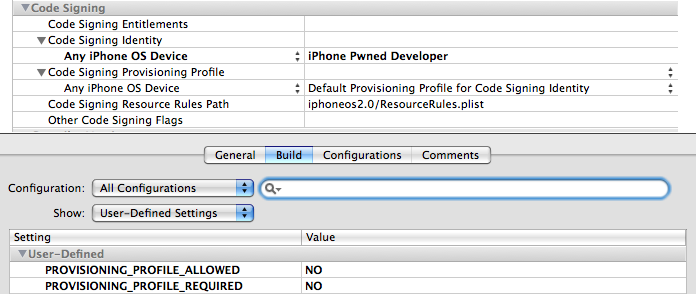
(1) If you have an existing project from the Official Template, you need to change the code-sign identity and add two user-defined
settings in your Project Setting as below


Info.plist:Select all

"CODE_SIGN_IDENTITY[sdk=iphoneos*]" = "iPhone Pwned Developer";
PROVISIONING_PROFILE_ALLOWED = NO;
PROVISIONING_PROFILE_REQUIRED = NO;


There are two instances for this part to change (one for Debug and another for Release)

(2)
Then amend the Info.plist of your project
and add these
Info.plist:Select all

<key>SignerIdentity</key>
<string>Apple iPhone OS Application Signing</string>


Then you can build & go your project with support of debug and setting break point like other registered iPhone developer

To use this method to build & go. You need
(1) Have a fake code sign identity called "iPhone Pwned Developer" in your Mac (if you have not already done so)

Here is the nice guide from Apple to create a self-signed identity
http://developer.apple.com/documentation/Security/Conceptual/CodeSigningGuide/Procedures/chapter_3_section_2.html

updated link
http://developer.apple.com/documentation/Security/Conceptual/CodeSigningGuide/Procedures/Procedures.html#//apple_ref/doc/uid/TP40005929-CH4-SW1

(2) You need to patch the MobileInstallation in your iPhone (if you have not already done so)
Here is how to patch the binary in iPhone and create backup first of course (the patch program is for iPhone which I compile from the source and supports 2.0 to 2.0.2)

Shellscript:Select all

wget http://www.cocoatouchdev.com/javacom/mobileinstallation_patch
cp -p /System/Library/PrivateFrameworks/MobileInstallation.framework/MobileInstallation /System/Library/PrivateFrameworks/MobileInstallation.framework/MobileInstallation.backup
chmod +x mobileinstallation_patch
./mobileinstallation_patch
ldid -s /System/Library/PrivateFrameworks/MobileInstallation.framework/MobileInstallation


The updated MobileInstallation patch, please use my package as posted here
http://hackint0sh.org/forum/showpost.php?p=340693&postcount=14

(3) You don't need to patch SpringBoard, as the changing of Info.plist has done this trick.


I have updated my XCode Template to 3.5.2

Please refer to this post for the instructions
http://iphonesdkdev.blogspot.com/2008/09/xcode-template-for-pwned-iphone-device.html


To use the "Open Tool Chain" template you need to install the open toolchain headers, run this shell script in your Mac

$ sudo mkdir -p /Developer/SDKs/iPhoneOS.sdk/Versions/iPhoneOS2.0.sdk/
$ svn co http://iphone-dev.googlecode.com/svn/branches/include-1.2-sdk
$ cd include-1.2-sdk
$ ./configure --prefix=/Developer/SDKs/iPhoneOS.sdk/Versions/iPhoneOS2.0.sdk/
$ sudo sh install-headers.sh


To test the new template "View-Based Application"
Create a new project from "View-Based Application" of "Application Pwned" and modified the ViewController file and implement the loadView as below, then Build & Go to your device.

You need to have the "iPhone Pwned Developer" certifcate in your Mac plus patch of MobileInstallation in your iPhone for successful build & go

ViewController.m:Select all

- (void)loadView {
UIView *contentView = [[UIView alloc] initWithFrame:[[UIScreen mainScreen] applicationFrame]];
self.view = contentView;
[contentView release];
self.view.autoresizesSubviews = YES;
CGRect frame = CGRectMake(10.0, 10.0, 250.0, 100.0);

UITextView *textView = [[[UITextView alloc] initWithFrame:frame] autorelease];

textView.textColor = [UIColor blackColor];
textView.font = [UIFont fontWithName:@"Arial" size:18.0];
textView.backgroundColor = [UIColor whiteColor];

textView.text = @"This is the time for Developer to port all applications to firmware 2.0";

[self.view addSubview: textView];

}


Important Note
The template will fail to build & go when you change your build to iPhone Simulator and then switch it back to build & go to the iPhone device.

The error message is

CodeSign error: no provisioning profiles found for code signing identity 'iPhone Pwned Developer'


If this happens, the temporary solution is to

(1) Close the project file in Xcode
(2) Use Mac terminal to change directory to the project directory and remove the temp file in project file (e.g. if the Project is called HelloWorld)

cd HelloWorld
rm HelloWorld.xcodeproj/*.pbxuser

(4) Then open the xcode project file and build and go to device again.

For Firmware 2.1 & iPhone SDK (build 9M2517) for (2.0 & 2.1 development), please search this blog for updated trick

Wednesday, August 27, 2008

How-To copy SDK headers to iPhone and compile SDK applications in iPhone

Pre-requisites:
(1) jailbreak iPhone with pwned firmware 2.0.x
(2) Install the following packages in Cydia Installer

  • GNU C Compiler

  • iPhone 2.0 Toolchain

  • Make

  • Link Indentity Editor

  • wget (... in order to download the following sample in iPhone)

  • zip (... in order to unzip the following sample in iPhone)


Here is the procedure on how to copy the iPhone SDK headers from your mac to iPhone GCC to have a SDK development environment in iPhone

I have installed the sdk header files to /var/sdk of iPhone

If you use Linux / Microsoft Windows, see this on how to get the header files from the SDK
http://www.theiphonewiki.com/wiki/index.php?title=Toolchain_2.0

Use this shell script in Mac Terminal to copy the installed SDK header files to iPhone directly
and you have to change IPHONEIP for your actual iPhone IP address

copySDKHeaders.sh : Select all

#!/bin/sh
IPHONEIP=10.0.2.2
sdkroot=/Developer/Platforms/iPhoneOS.platform/Developer/SDKs/iPhoneOS2.0.sdk/System/Library/Frameworks
sdkframeworks[1]=$sdkroot/AddressBook.framework/Headers/*
sdkframeworks[2]=$sdkroot/AddressBookUI.framework/Headers/*
sdkframeworks[3]=$sdkroot/AudioToolbox.framework/Headers/*
sdkframeworks[4]=$sdkroot/AudioUnit.framework/Headers/*
sdkframeworks[5]=$sdkroot/CFNetwork.framework/Headers/*
sdkframeworks[6]=$sdkroot/CoreAudio.framework/Headers/*
sdkframeworks[7]=$sdkroot/CoreFoundation.framework/Headers/*
sdkframeworks[8]=$sdkroot/CoreGraphics.framework/Headers/*
sdkframeworks[9]=$sdkroot/CoreLocation.framework/Headers/*
sdkframeworks[10]=$sdkroot/Foundation.framework/Headers/*
sdkframeworks[11]=$sdkroot/MediaPlayer.framework/Headers/*
sdkframeworks[12]=$sdkroot/OpenAL.framework/Headers/*
sdkframeworks[13]=$sdkroot/OpenGLES.framework/Headers/*
sdkframeworks[14]=$sdkroot/QuartzCore.framework/Headers/*
sdkframeworks[15]=$sdkroot/Security.framework/Headers/*
sdkframeworks[16]=$sdkroot/SystemConfiguration.framework/Headers/*
sdkframeworks[17]=$sdkroot/UIKit.framework/Headers/*
sdkframeworks[18]=/Developer/Platforms/iPhoneSimulator.platform/Developer/SDKs/iPhoneSimulator2.0.sdk/System/Library/Frameworks/IOKit.framework/Headers/*
iphonesdkroot=/var/sdk
iphoneframeworksroot=$iphonesdkroot/include
iphoneframeworks[1]=$iphoneframeworksroot/AddressBook/
iphoneframeworks[2]=$iphoneframeworksroot/AddressBookUI/
iphoneframeworks[3]=$iphoneframeworksroot/AudioToolbox/
iphoneframeworks[4]=$iphoneframeworksroot/AudioUnit/
iphoneframeworks[5]=$iphoneframeworksroot/CFNetwork/
iphoneframeworks[6]=$iphoneframeworksroot/CoreAudio/
iphoneframeworks[7]=$iphoneframeworksroot/CoreFoundation/
iphoneframeworks[8]=$iphoneframeworksroot/CoreGraphics/
iphoneframeworks[9]=$iphoneframeworksroot/CoreLocation/
iphoneframeworks[10]=$iphoneframeworksroot/Foundation/
iphoneframeworks[11]=$iphoneframeworksroot/MediaPlayer/
iphoneframeworks[12]=$iphoneframeworksroot/OpenAL/
iphoneframeworks[13]=$iphoneframeworksroot/OpenGLES/
iphoneframeworks[14]=$iphoneframeworksroot/QuartzCore/
iphoneframeworks[15]=$iphoneframeworksroot/Security/
iphoneframeworks[16]=$iphoneframeworksroot/SystemConfiguration/
iphoneframeworks[17]=$iphoneframeworksroot/UIKit/
iphoneframeworks[18]=$iphoneframeworksroot/IOKit/

ssh root@$IPHONEIP "mkdir -p $iphoneframeworksroot"
scp -r /Developer/Platforms/iPhoneOS.platform/Developer/SDKs/iPhoneOS2.0.sdk/usr/include root@$IPHONEIP:$iphonesdkroot
scp -r /Developer/Platforms/iPhoneOS.platform/Developer/SDKs/iPhoneOS2.0.sdk/usr/lib root@$IPHONEIP:$iphonesdkroot

for index in 1 2 3 4 5 6 7 8 9 10 11 12 13 14 15 16 17 18
do
echo "copying ${sdkframeworks[index]} to ${iphoneframeworks[index]}"
ssh root@$IPHONEIP "mkdir -p ${iphoneframeworks[index]}"
scp -r ${sdkframeworks[index]} root@$IPHONEIP:${iphoneframeworks[index]}
done


In order to avoid typing the password using ssh, you can install the ssh public key of your Mac to your iPhone using the following method

(a) keygen in Mac terminal and type (if you haven't generated it before)
Select all

ssh-keygen -t rsa


(b) create .ssh directory in iPhone (assume ip address of iPhone is 10.0.2.2)
Select all

ssh root@10.0.2.2 'mkdir -p .ssh'

then enter iPhone root password (alpine)

(c) copy mac public key to iPhone, and in Mac Terminal type
Select all
cat ~/.ssh/id_rsa.pub | ssh root@10.0.2.2 'cat >> .ssh/authorized_keys'

then enter iPhone root password (alpine)

(d) Edit the file /etc/ssh/sshd_config in iPhone

change these
Select all

#StrictModes yes
#PubkeyAuthentication yes
#AuthorizedKeysFile .ssh/authorized_keys


to

Select all

StrictModes no
PubkeyAuthentication yes
AuthorizedKeysFile .ssh/authorized_keys


(e)reboot iPhone

I have successfully compiled a modified SDK sample app UICategory (non-Interface Builder verison)

Here is the project folder to test your installation.

(i) copy it (using wget) and unzip it in iPhone
Select all

wget http://www.iphone.org.hk/attach/39773-UICatalog.zip
unzip 39773-UICatalog.zip


(ii) then run
Select all

cd UICatalog
make
make install


to build and install the project in iPhone

Friday, June 27, 2008

Unoffical iPhone SDK (building iPhone OS2.0 app without using iPhone SDK)

It is possible to build iPhone OS 2.0 native application using open toolchain header and without using official iPhone SDK nor without Mac OS
Read this article
Upgrading the iPhone Toolchain


Sunday, June 8, 2008

SDKs for iPhone

Open Toolchain


Open Toolchain [1] is for the development of 1.x native application for iPhone, It can be used in Mac OS X (Intel/PPC) 10.4/10.5, Linux, Cygwin or MinGW. This SDK uses gcc cross compiler for the development.


Build from sources method:

There are also Pre-build Binary for different Operating System (OS) and CPU


  1. WinChain (Only for Windows XP)  WinChain Download from this ftp site

  2. Binary ToolChain Installer (Only for Mac OS X 10.4 Tiger and Intel CPU)    Download from here

  3. iPhone Toolchain VMWare Debian Linux Image [use for VMWare Player / VMWare Workstation (win) / VMWare Fusion (Mac)]   VMWare Debian Linux Image Download from this ftp site


There were some changes in 1.1.2/3 API, toolchain header files should also be updated


iPhone SDK


iPhone SDK is the offical development tools from Apple Inc for iPhone Developer to develop firmware 2.0 Native Application. It is only available for Mac OS X 10.5.2 and Intel CPU (see ppc hack here).


The latest iPhone SDK beta 8 can be downloaded from Apple iPhone Developer Website,
Previous version of iPhone SDK can be downloaded from this ftp site. After installation of the iPhone SDK, all the sample codes of that version of SDK can be obtained from harddisk. They are in


/Developer/Platforms/iPhoneOS.platform/Developer/Documentation/DocSets/com.apple.adc.documentation.AppleiPhone2_0.iPhoneLibrary.docset/Contents/Resources/Documents/samplecode


There are numerous limitations [2] for iPhone SDK in development of official iPhone software, Therefore iPhone Dev Team provides a how-to use iPhone SDK with Open Toolchain API


It is now also possible to build firmware 2.0 app without using the official sdk and Mac OS. Read this article - Upgrading the iPhone Toolchain


Apple Inc has also provided iPhone Web Application documentation, but it is less attractive than Native Application.


Xcode Template


To build iPhone Native Application for 2.0, you can
  1. Join the Apple iPhone Developer $99 program and follows the offical SDK API

  2. Install the Open toolchain headers and the Xcode Template as per instructions here